
WiseTracker is a tracker — the classic FastTracker 2 / Renoise way
of making music, where you type notes and effects into a grid and edit fast from the keyboard.
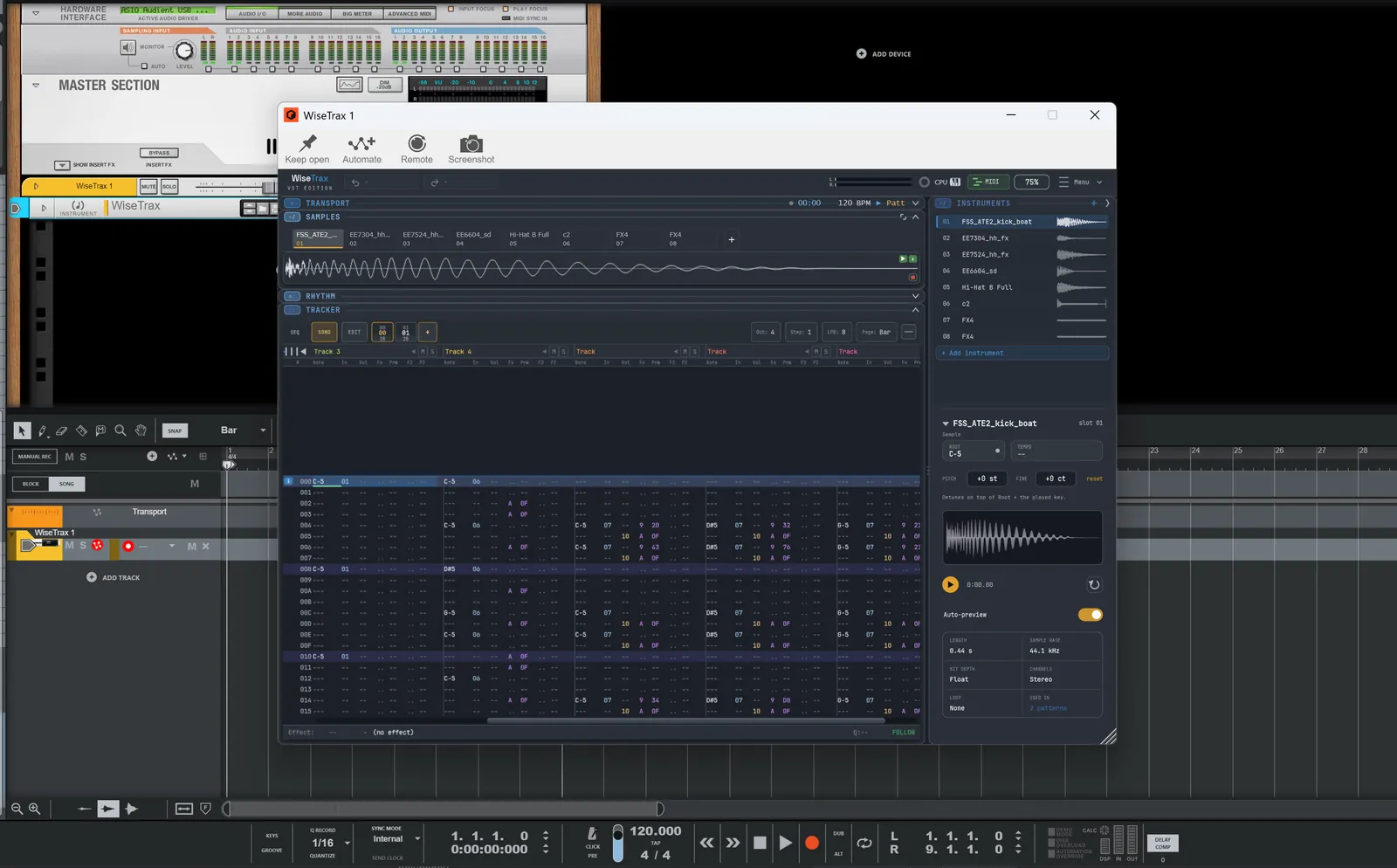
Drop in a sound, build a kit, generate a beat, or just use it as a sampler. It runs
two ways: as WiseTrax, a VST3 plugin loaded inside your DAW,
or as the WiseTracker standalone app — no DAW required. Both ship from one
codebase, in one download — and a song is one .wise file, so you can start in
one and pick it up in the other.
Built by one person & Claude. In active development.
Plugin or standalone — same tracker.
Load WiseTrax as a VST3 instrument and it plays in time with your DAW,
takes MIDI from your keyboard, and saves inside your project. Or open the
WiseTracker app on its own — it has its own transport and tempo, picks its
own audio device, and saves songs as .wise files. Pick whichever fits what
you're doing; the layout, the engine and your muscle memory carry across.
- WiseTrax — VST3 instrument, synced to host tempo and transport, multi-instance
- WiseTracker — standalone Windows app, no DAW needed, own audio device
- A transport bar — one Play/Stop (SPACE plays the pattern you're on), live position + clock, song BPM, a visible Follow toggle and one Loop control, plus metronome and tap tempo
- One file format — save a song as a
.wisefile in either one and open it in the other, or hand it to someone running the other
Build a beat by clicking a grid.
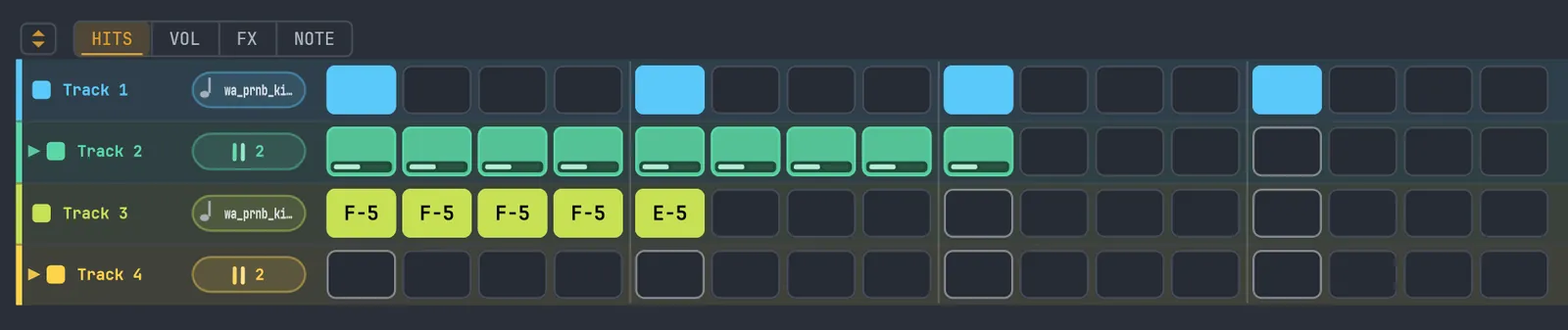
Switch the RHYTHM panel to STEPS for a click-to-build step grid. Every track — and every lane — gets a row of steps across the pattern; click a step to place or clear a note. It edits the same pattern as the tracker grid, so the two always stay in sync.
- Four edit modes set what a click does — HITS (place notes), VOL (per-step level), FX (a per-step effect) or NOTE (pitch)
- Fills the window with as many whole bars as fit, groups steps in fours, and follows the playhead
- Fold a multi-lane track's lanes into one summary row to keep a busy track compact
- A pattern counter and arrows step through the song's patterns without leaving the grid
A grid you play with the keyboard.
Type notes straight into the grid, tweak values right in place, and move around without touching the mouse. Up to 64 tracks and 256 instruments per song, with 128-voice polyphony.
- Per-track mute, solo, volume, pan, colour and rename
- 200 levels of undo/redo with named steps — it tells you what it just undid
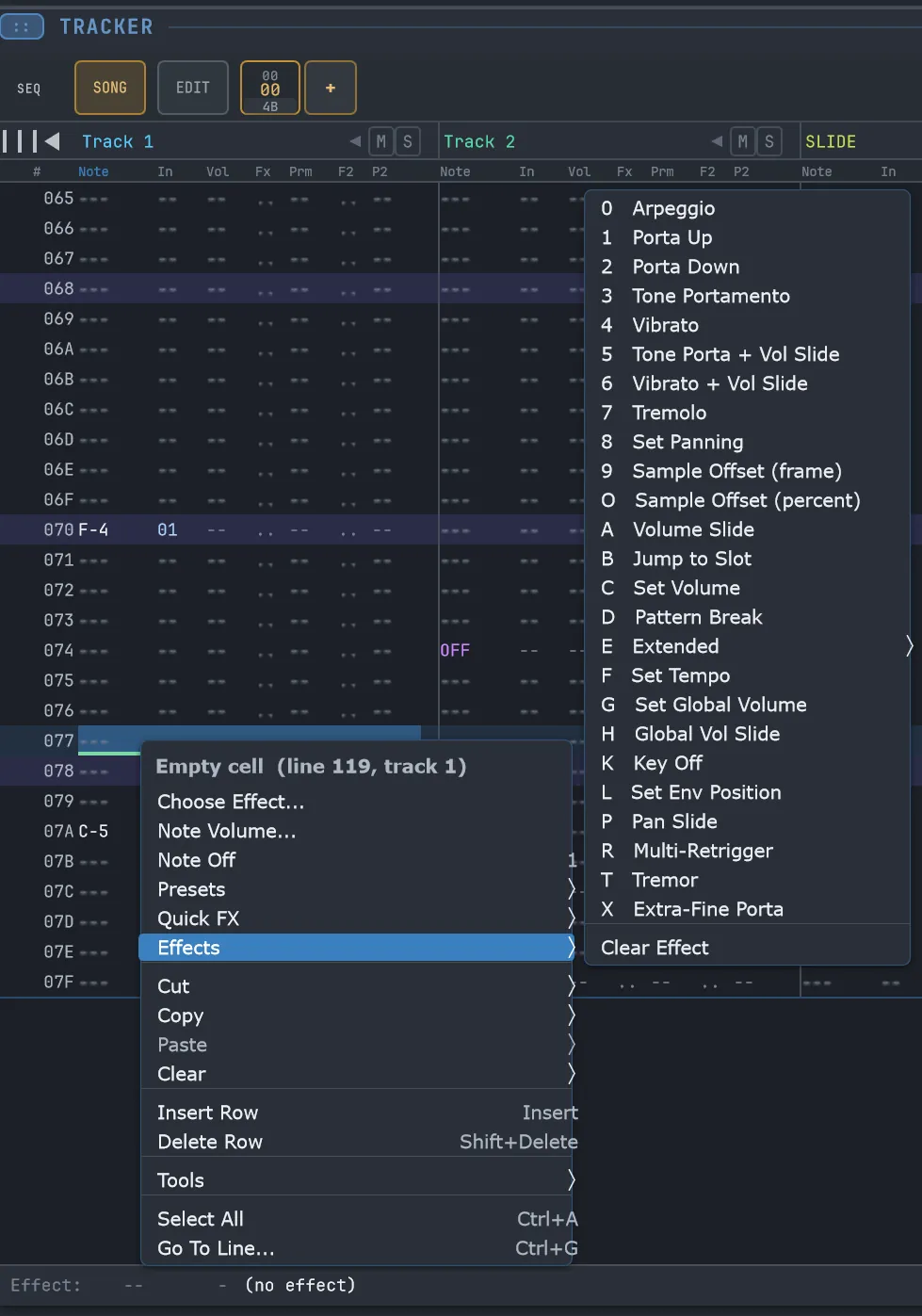
- Full FastTracker-2-style effects, plus extended and WiseTracker-native commands
- Lines Per Beat sets the grid — how many rows make one beat — with one-click Double / Halve that changes the grid but keeps the timing
- Horizontal and vertical scrollbars, so wide or long songs stay easy to move through
Several notes on one track.

Each track can hold up to 10 side-by-side note lanes, so a chord — or a whole kick / snare / hat groove — lives on one track instead of being spread across many. Add and remove lanes with the − and + by the track name; a multi-lane track reads as one group, its name centred over the lanes with each one numbered.
- Up to 10 lanes per track — chords and drum groups on a single track
- Removing a lane keeps its notes; bring it back any time, or tidy a track to just the lanes it uses
- All lanes share the track's instrument, volume, pan and mute; Tab steps through them
- The rhythm generator and step sequencer both write into the lane your cursor is on
Records what you play — and never loses a take.
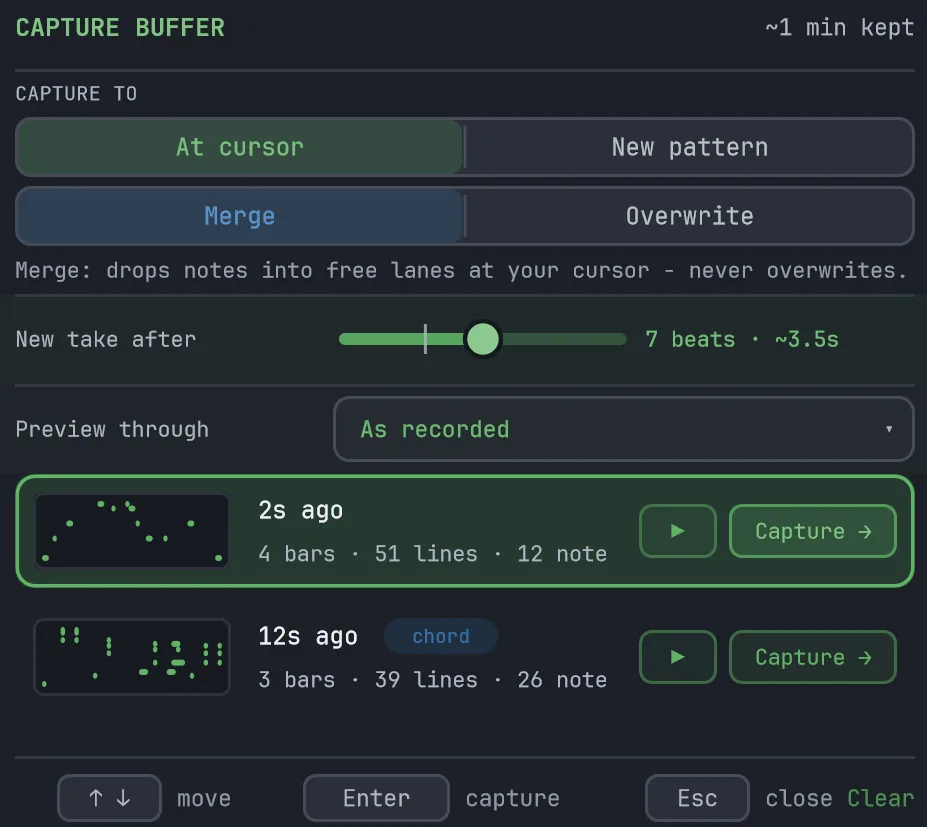
Arm REC, press play, and the notes from your MIDI keyboard land in the grid with their velocity and timing — hold a chord and it fans across the track's lanes so each note keeps its place. And because WiseTrax keeps a rolling buffer of the last few minutes you played — even with recording off — a good take is never lost to a forgotten record button.
- Record live into the pattern that's playing, with quantize and note-length options
- Retrospective Capture — grab what you just played after the fact; the CAP button shows how many takes are waiting
- Preview a take at your song tempo, then drop it in at the cursor (merged into free lanes, never overwriting) or as a new pattern
- Each take shows its length, note count and a chord tag; one Ctrl+Z undoes a drop-in
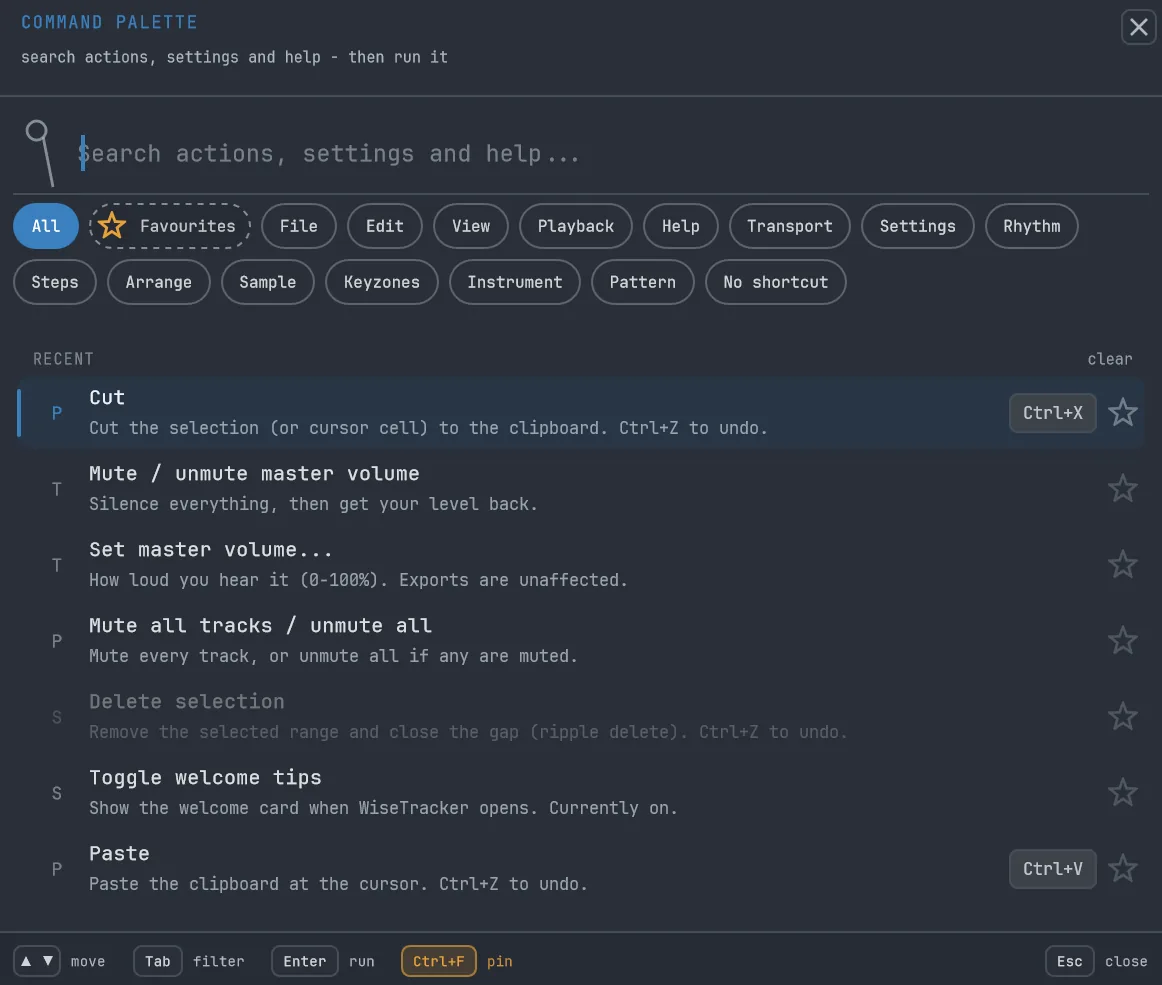
Find and run anything — Ctrl+P.
One shortcut opens a search box over the whole app. Type the letters you remember — "imp" finds Import module, "und" finds Undo — and press Enter to run it. Every row shows its own keyboard shortcut, so you pick up the keys as you go, and anything that can't run right now sits dimmed with a short line saying why.
- Fuzzy search across every action, setting and help page — the letters that match light up
- Or browse by area — File, Edit, Sample, Steps, or the actions with no shortcut of their own
- Favourites — pin the moves you use all day with Ctrl+F and fire them with Alt+1–9 from anywhere, even inside your DAW
- A Recent group remembers what you just used, between sessions

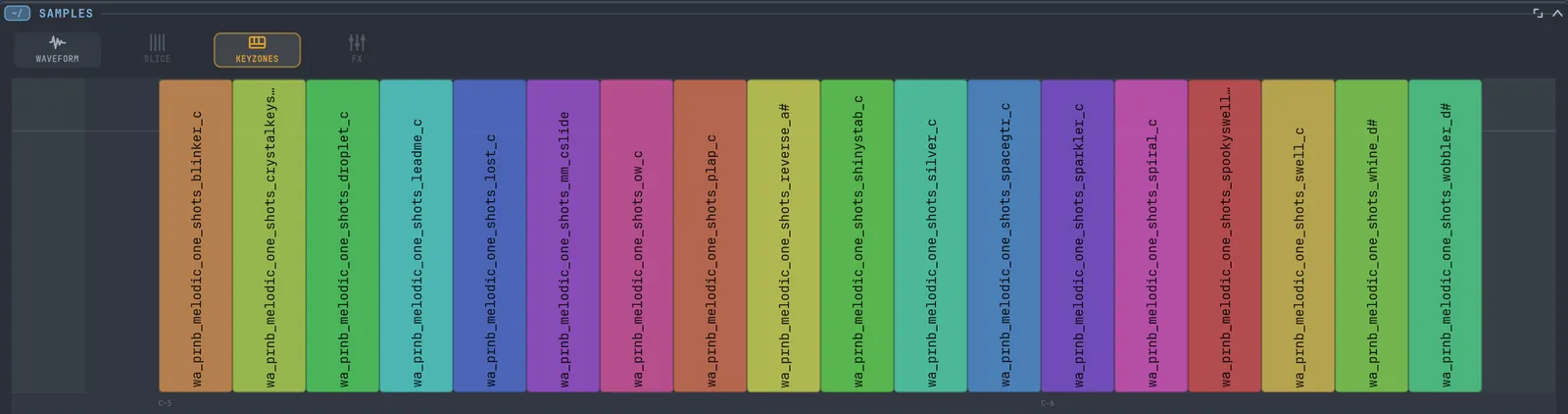
Map a kit across the keyboard.
Drop several samples into one instrument and lay them out across the keys on the KEYZONES keymap — one sound per key for a drum kit, or a stack of layers for a full-range instrument.
- Visual keymap — drag a zone to re-map it, zoom in for fine work
- Zones light up live as notes come in from MIDI or the grid
- Record a kit from a controller, one key at a time
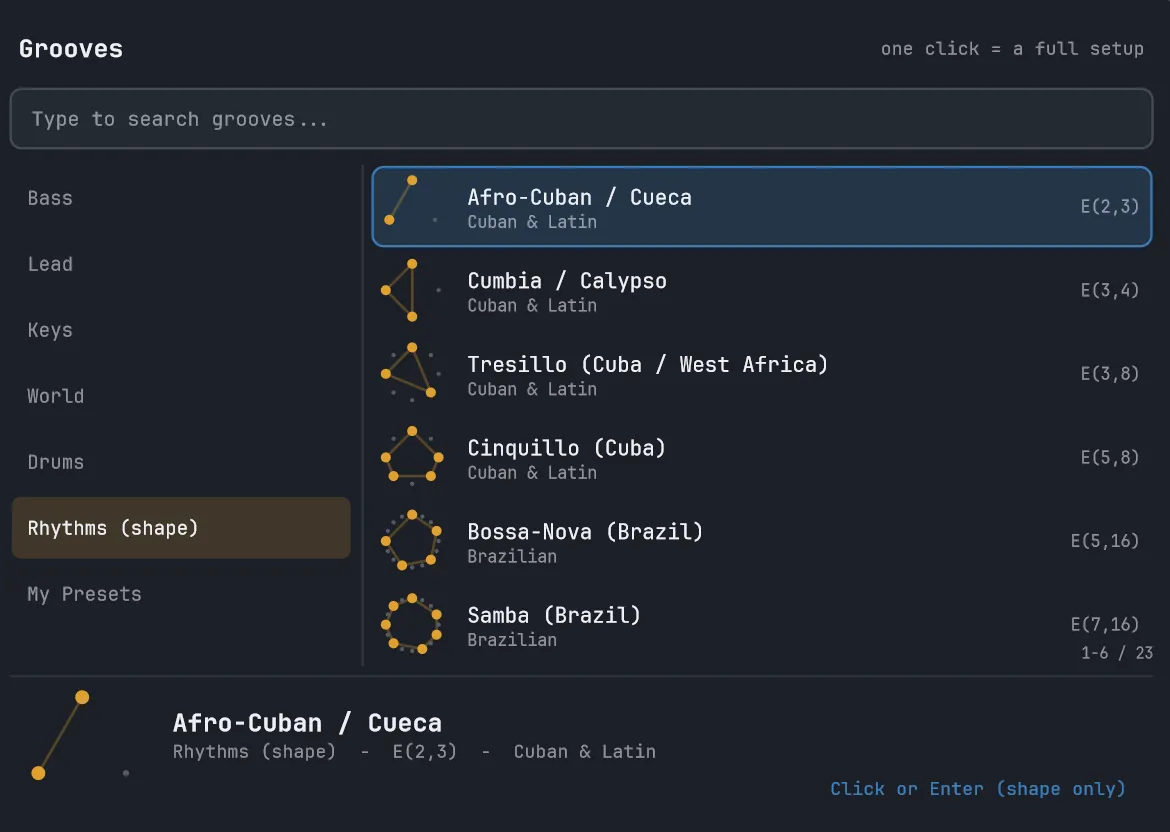
Turn hits-over-steps into a beat.
Set how many hits land across how many steps and the RHYTHM panel spreads them evenly as a Euclidean pattern — the maths behind a lot of the world's grooves. Add accents, rotate it, walk it through a scale for an in-key melody, then STAMP it straight into the grid.
- Euclidean beats with hits, steps, rotation and accents
- Scale-walk melodies — turn a rhythm into notes in key
- A browser of world rhythms and ready-made grooves — one click sets it up

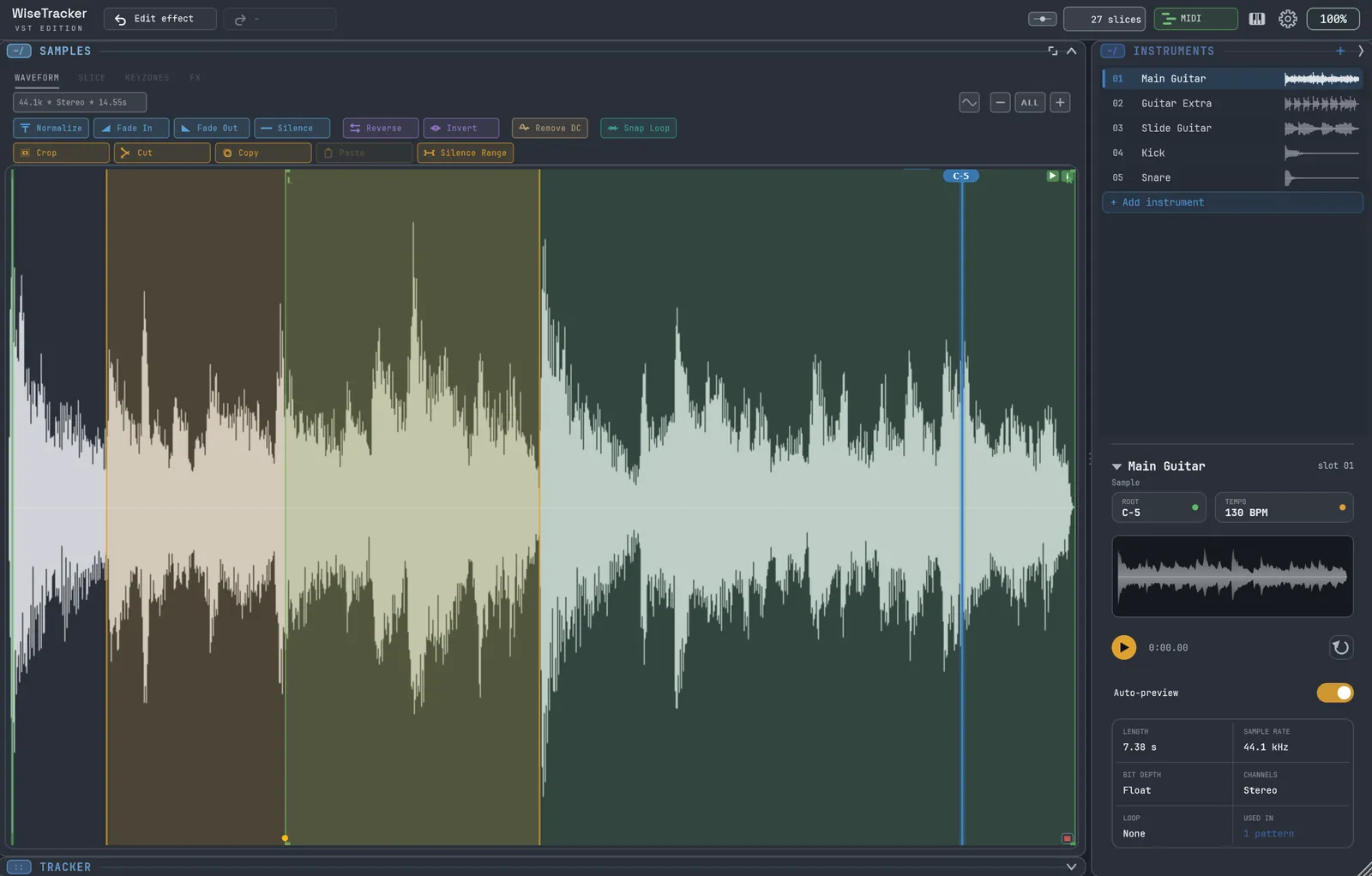
Drop in sounds, slice, and go.
Drag in WAV, AIFF, FLAC or OGG files — one at a time, in a batch, or a whole folder at once, each file becoming its own auto-named instrument. Edit the waveform and slice a loop at its hit points to chop it into playable pieces.
- Automatic slicing at each hit — the natural beats in a loop — with a sensitivity control, plus a loop-tempo estimate
- Waveform tools — normalize, fade, reverse, crop, silence, remove DC, snap loop
- One file, a batch, or a whole folder — each becomes its own instrument
Set the root, then tune to taste.
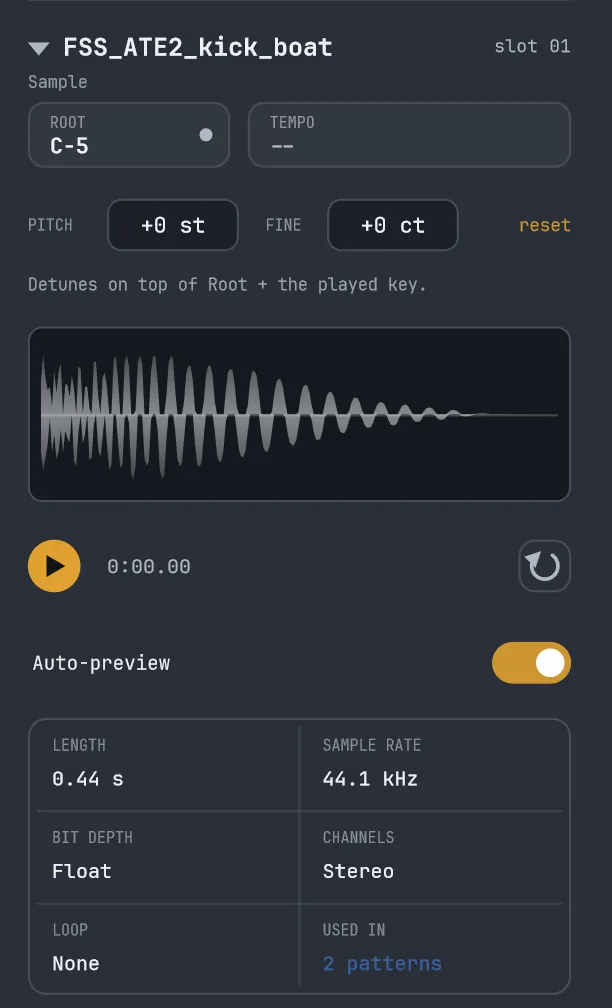
Set a sample's root note and tune it with Pitch and Fine — semitones and cents on top of the root — including fixed one-shots and drums. The inspector shows what you're working with at a glance, and how many patterns already use it.
- Pitch and Fine, layered on top of the root note and the played key
- Root note, tempo, length, sample rate, bit depth, channels and loop
- See how many patterns use a sample, and preview it with play / loop
Open your old .xm, .mod, .s3m and .it files.
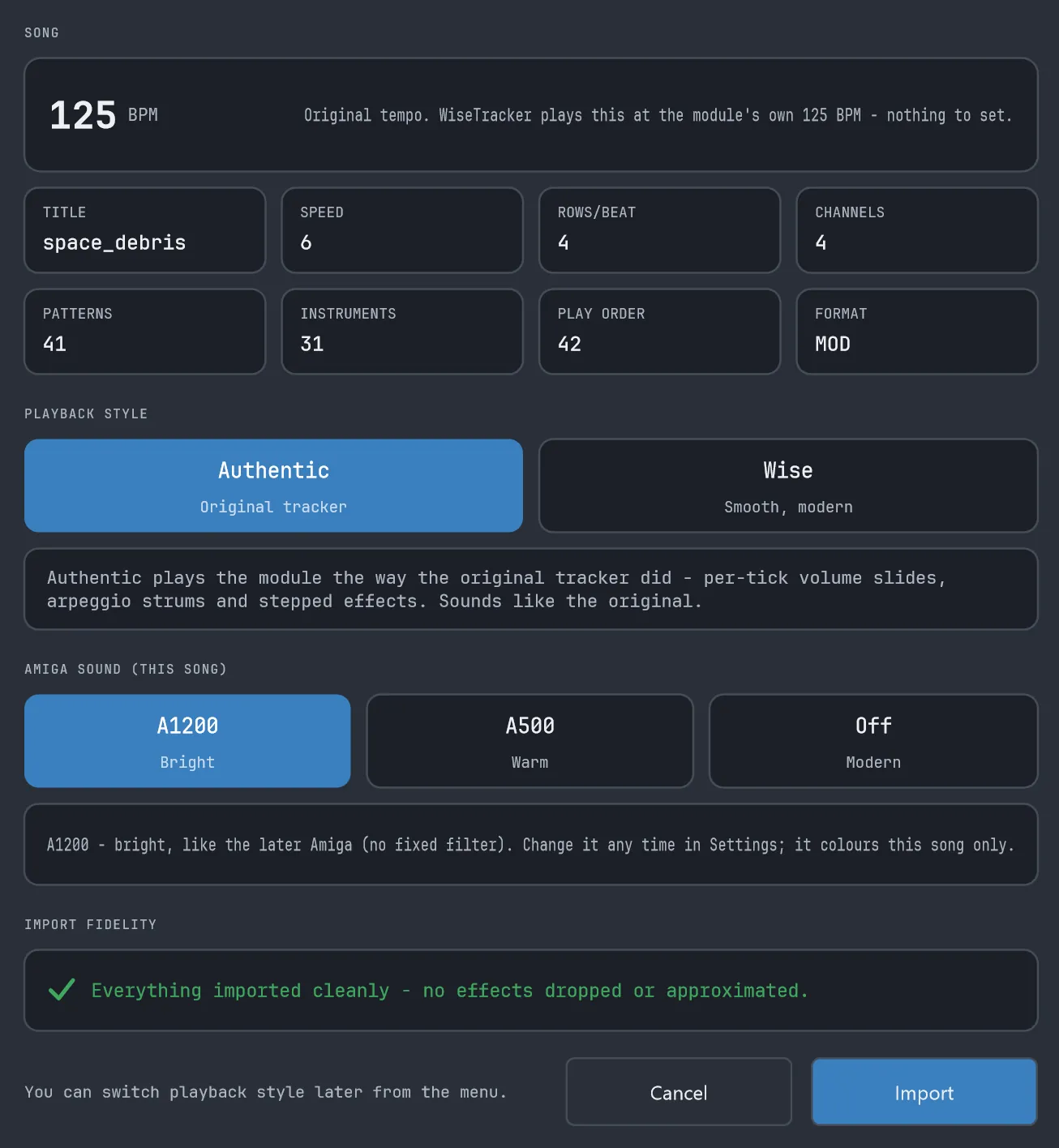
Drop in a module from FastTracker 2, Amiga ProTracker, Scream Tracker 3 or Impulse Tracker and an import box shows you what's inside before it loads — tempo, channels, patterns and instruments — with an honest note of anything it had to approximate. Choose how it should play, hit Import, and it opens as a fully editable song.
- Four formats —
.xm,.mod,.s3mand.it— plus the older 15-sample Amiga.mod, detected automatically - Authentic Amiga sound for
.mod— pick A1200 (bright) or A500 (warm), changeable while it plays, for faithful Amiga pitch, vibrato and tremolo - Authentic or Wise playback — the original tracker's effects played faithfully, or smoothed out; switch any time
.xmand.modare the most complete;.s3mand.itimport the essentials faithfully (samples, notes, tuning, structure) with a few advanced effects still being refined — the import box tells you what, up front
Save it, render it, share an instrument.
Save and open your songs as .wise files, with Open Recent and a New command to
start fresh. Render the whole song to audio — WAV, FLAC or OGG. Export an instrument on its
own as .wiseinst to reuse or pass around.
- Save / Open
.wisesongs, plus Open Recent and New to start fresh - Render the whole song to audio — WAV, FLAC or OGG
- Export or import a single instrument as
.wiseinstto reuse or share

Set up the way you like it.
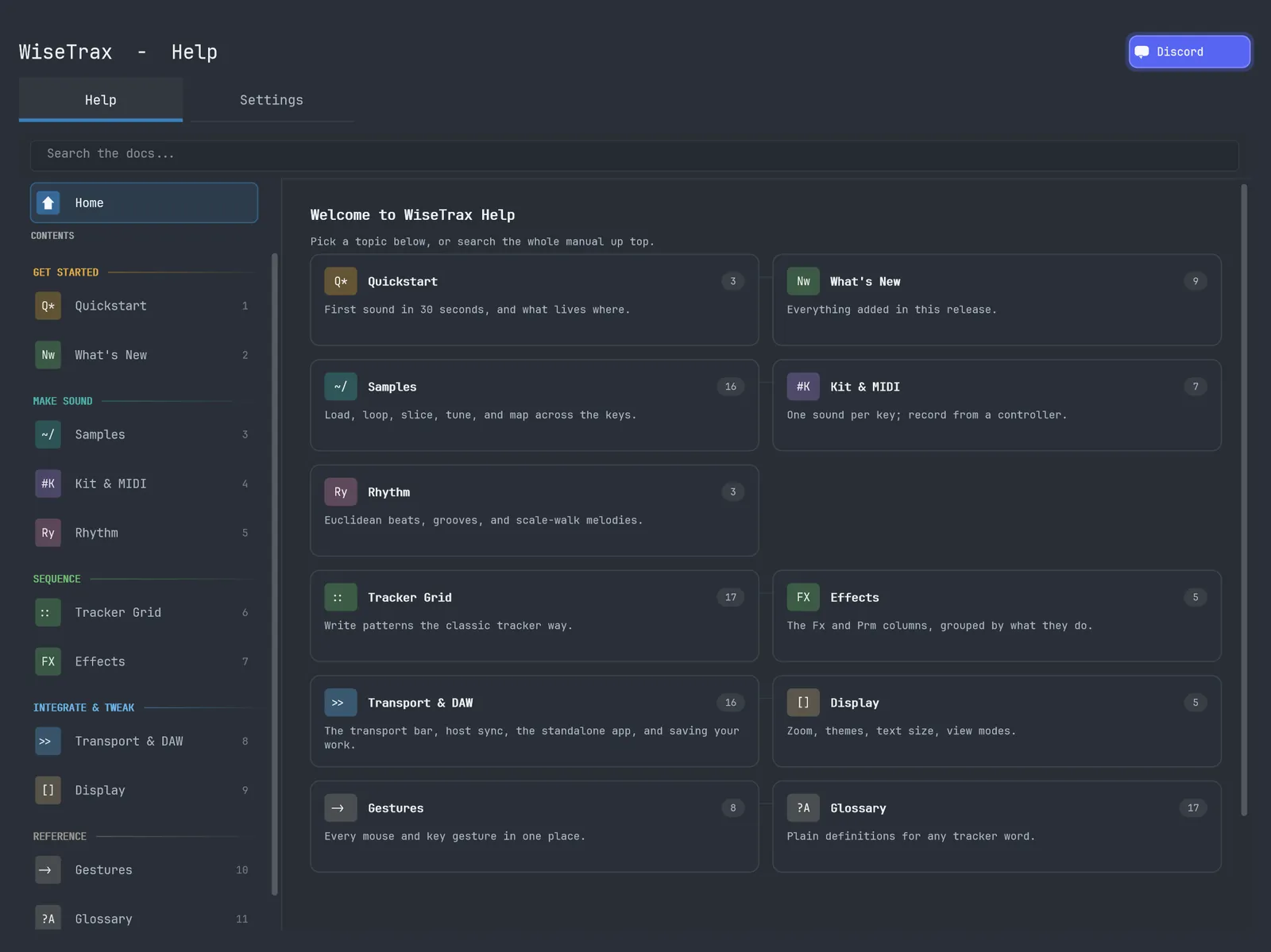
Four dark themes, whole-UI zoom from 50% to 200% so it stays crisp on a 4K display, and three ways to watch the pattern play. A level and CPU meter sit up top, and the in-app Help is a searchable home page if you get stuck.
- Cinema — smooth ghost scrolling
- Classic — static grid with a playhead bar
- Locked — keep editing freely while it plays
Grab the latest build
Free while it's in public beta. One download — the WiseTrax plugin and the WiseTracker app, both inside. Windows. See the release notes for what's new.
Download v0.3.1 · ~11.6 MBWhat's in the zip
WiseTrax.vst3— the plugin, for any VST3 hostWiseTracker.exe— the standalone app, runs on its ownREADME.txtandCHANGELOG.txt
What you need
- Windows
- For the plugin: a VST3 host (any modern DAW). Built and tested in Reason 13, and run by beta testers across all sorts of DAWs.
- For the standalone: nothing else — just run the
.exe.
How to install
- Unzip the download.
- Plugin: copy
WiseTrax.vst3intoC:\Program Files\Common Files\VST3\, then rescan plugins in your DAW and add WiseTrax as an instrument. - Standalone: run
WiseTracker.exe, choose your audio device, drop in a few samples, and start playing.
Questions
Do I need a DAW?
No. You can run the WiseTracker standalone app on its own — it has its own transport, tempo and audio device. Or load WiseTrax as a VST3 plugin if you'd rather work inside your DAW. Both are in the same download.
What's the difference between WiseTrax and WiseTracker?
Same tracker, two ways to run it. WiseTrax is the VST3 plugin — it loads in your DAW and syncs to its tempo and transport. WiseTracker is the standalone desktop app — no DAW needed. They share the engine, the layout and the file format.
Can I move a project between the plugin and the standalone?
Yes. A whole song — patterns, samples, kit and settings — saves to a single .wise file, and both WiseTrax and WiseTracker read and write it. So you can start in the standalone and finish in your DAW, or the other way round, and you can hand a .wise (or a single .wiseinst instrument) to anyone running either one. The .wise file stands on its own, separate from your DAW project.
Is it free?
Yes — free while it's in public beta. At full release it'll move to the PolyForm Shield License (so still free).
Which DAWs does the plugin work in?
Any host that loads VST3 plugins. It's built and tested mainly in Reason 13, and beta testers run it across all sorts of DAWs. If your DAW loads VST3s, it should load WiseTrax. Please report any bugs.
Is there a Mac / Linux / CLAP version?
Not yet — it's Windows and VST3 for now. I'm a solo developer, and I build and use WiseTracker on Windows in Reason myself, so that's the one setup I can properly test on while I'm making it. Mac, Linux and a CLAP version are all things I'd genuinely like to do — I just don't want to ship something I can't test properly yet, so there's no date. I know there's interest, so they're firmly on the list.
How do I install it?
Unzip the download. For the plugin, copy WiseTrax.vst3 into C:\Program Files\Common Files\VST3\ and rescan plugins in your DAW. For the standalone, just run WiseTracker.exe. Full steps are in the download section above.
It's a beta — should I expect bugs?
Yes, honestly — it's a beta. WiseTracker is growing fast, and since I'm one person building it, no matter how much I test, some bugs are going to slip past me. That's where you come in: if something looks off, sounds wrong, or breaks, letting me know really does help — often it's the only way I find out. The best place is the Discord; a quick note on what you did and what happened is perfect. Thanks for helping make it better.
Can I download an older version?
You almost always want the latest build — grab it from the download section above; older ones have more bugs and fewer features. But if a project needs a specific build, here they are:
Release notes
What changed in each public build — newest first. Click one to expand.
v0.3.1 Live recording, Retrospective Capture, a command palette + a master volume 2026-07-17
- Record live into the grid — arm REC in the transport, press play, and the notes you play on your MIDI keyboard land in the pattern with their velocity and timing; hold a chord and it fans across the track's lanes so each note keeps its place.
- Retrospective Capture — WiseTrax keeps a rolling buffer of the last few minutes you played, even with REC off, so a good take is never lost to a forgotten record button. The CAP control lists your recent takes — preview one, then drop it in at the cursor or as a new pattern.
- Command palette (Ctrl+P) — search and run any action, setting or help page by name; it's fuzzy, and each row shows its shortcut. Pin the moves you use most as Favourites and fire them with Alt+1–9 from anywhere.
- A master volume — the level meter in the top bar is now the fader: drag, scroll or double-click to set how loud you hear it. It's a listening level, so your exported files are unaffected.
- One sampler — the big waveform and the small one above the grid are the same editor now: it opens fullscreen, shows stereo samples in stereo, and you can draw a loop in a single Alt+drag.
- Hover help rewritten across the whole app as tidy two-tone cards, chord-name spelling options, per-lane note pickers in STEPS, and a batch of fixes.
v0.3.0 Step sequencer, note lanes, reworked tempo grid + more module formats 2026-07-07
- Step sequencer — switch the RHYTHM panel to STEPS for a click-to-build beat grid, with four edit modes (HITS / VOL / FX / NOTE) per step; it edits the same pattern as the tracker grid.
- Note lanes — up to 10 notes on one track, so a chord or a whole kick / snare / hat groove lives on a single track.
- Lines Per Beat reworked — it now drives playback speed, with Double / Halve to change the grid while keeping the timing, and Expand / Shrink for a single pattern.
- Three more module formats — Scream Tracker
.s3m, Impulse Tracker.itand the older 15-sample Amiga.mod, with authentic Amiga sound (A1200 / A500) and more faithful ProTracker playback. - Rebuilt transport — one Play/Stop, SPACE plays the pattern you're on, a visible Follow toggle, and one Loop control for pattern-vs-song.
- Tidier hover tips across the tracker, a vertical grid scrollbar, and a batch of view fixes.
v0.2.2 Amiga .mod import + more faithful module playback 2026-06-20
- Import Amiga ProTracker
.modfiles — drag one in (or use the Import module menu), the same import box as.xm, loaded as a full editable song with faithful Amiga pitch and the Authentic/Wise playback choice. - Slide-to-note (tone portamento) lands on the right note even when the row doesn't re-state the instrument — the normal way
.modfiles write a pitch slide. - Note-delay, retrigger and tremor now land and roll at the right moment within the row, and effect memory (slides, fine pitch/volume, retrigger) is honoured.
- Notes revive, re-pan and fade out correctly when an instrument is re-stated or a note is released, and fadeouts play at the right speed.
- All of this is Authentic-style playback; Wise style and your own songs are unaffected.
v0.2.1 Module import box + faithful XM playback 2026-06-18
- New module import box — see an
.xm's tempo, channels, patterns and instruments before it loads, choose Authentic or Wise playback, and get an honest report of anything that had to be approximated. - Switch a loaded module between Authentic and Wise playback any time, from the Menu or Settings.
- More faithful XM playback — volume slides, arpeggio, tremor, speed changes, pattern breaks, note-cut and key-off now play the original way, and set-volume levels are correct.
- A built-in output safety ceiling keeps loud songs and imports from blasting or distorting (exports included); imported modules also load at a safer level.
- In a DAW the host's Play/Stop is always in charge; the standalone got its own app icon.
v0.2.0 First public beta — now a standalone app too 2026-06-15
- Now a standalone app (WiseTracker) alongside the VST (WiseTrax) — same tracker, no DAW required.
- A transport bar — Play/Stop, live position + clock, song BPM, Loop, metronome and tap tempo.
- Multisample instruments on a visual KEYZONES keymap.
- A rhythm generator — Euclidean beats, scale-walk melodies, a grooves library, and STAMP to the grid.
- Tune any sample (Pitch + Fine); save/open
.wisesongs, render to WAV/FLAC/OGG, import.xm, Open Recent. - Rewritten in-app Help, a master + CPU meter, and a grid scrollbar.
v0.1.x Closed beta — the foundations May–Jun 2026
- The pre-public builds (0.1.0–0.1.6), VST3 only: the tracker grid and song sequencer, the sampler with transient slicing and tempo detection,
.xm/.xiimport, four dark themes and 200-level undo. - These were closed beta and aren't downloadable here — v0.2.0 was the first public release.
Come help shape it.
WiseTracker is in public beta and made by one person, so your ears matter — a lot. If something breaks, feels off, or you wish it did a thing it doesn't yet, come say so on the Discord. Bug reports, "how do I…" questions and feature ideas are all equally welcome. No forms, no account walls — just drop in and say hi.
Join the Discord